
API: crawl, read and export links
Endpoints, defaults, inlinks/outlinks, pagination and CSV gzip exports. Copy cURL, PHP and Python examples.
On this page
Start, monitor and retrieve a crawl
Start a crawl, keep its ID, then read its status. The crawl and its documents are not complete when the first request returns.
| Action | Request | Effect |
|---|---|---|
| List your crawls | GET /v1/crawls |
Paginated read. |
| Start an audit | POST /v1/crawl |
Creates a crawl and uses the account’s audit quota. |
| Monitor an audit | GET /v1/crawl/{id} |
Status, progress and available links. |
| Read links | GET /v1/crawl/{id}/data/links |
Stored links with filters and pagination. |
| Export links | GET /v1/crawl/{id}/export/links |
Complete on-demand CSV gzip download. |
First, configure your API key. Examples use https://api.cuik.io, the production public API hostname.
1. Prepare the crawl
The form and request generator are available under API → Crawl Engine.
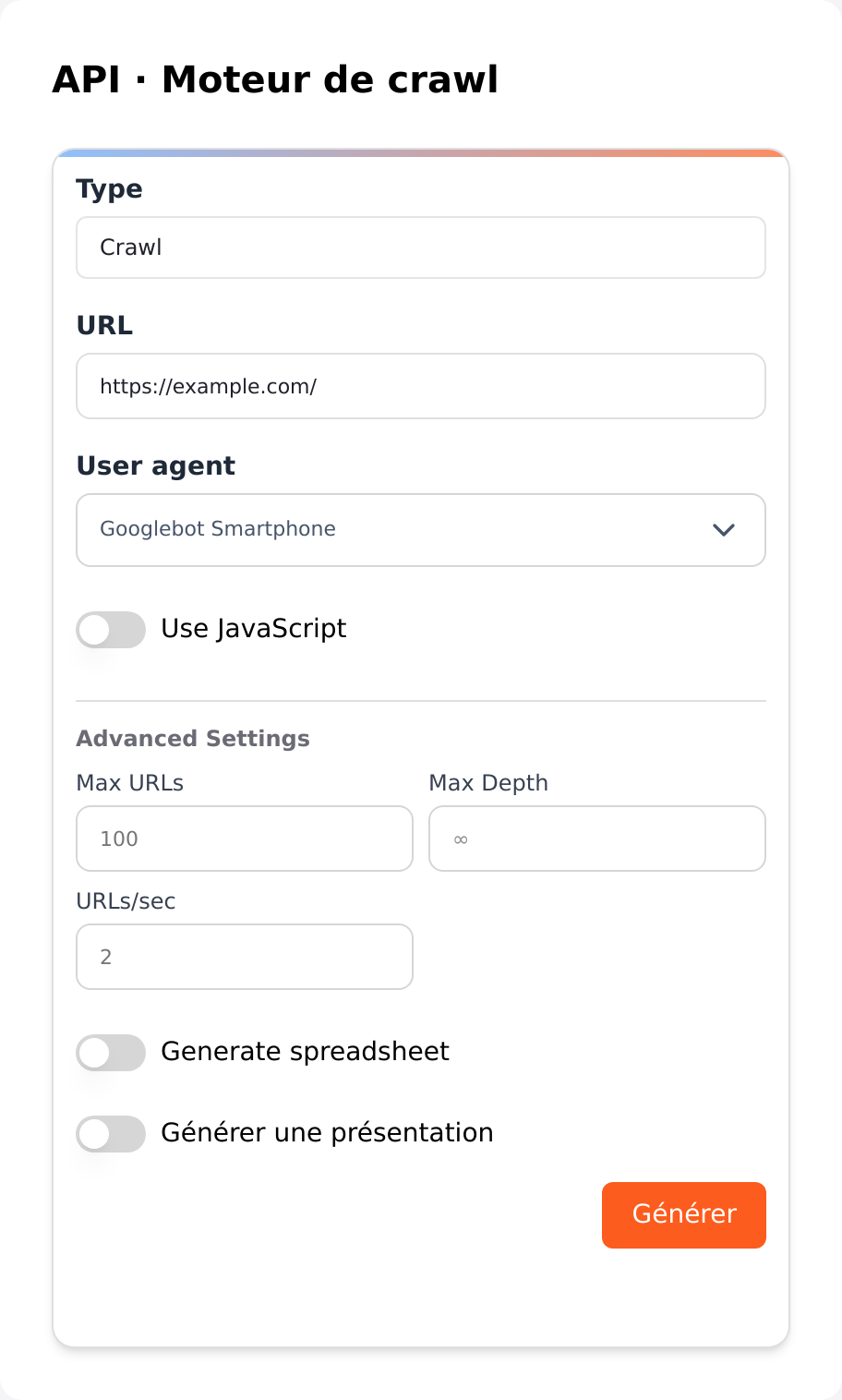 Actual Cuik form, shown in French with example.com. No crawl was started for this screenshot.
This example is limited to 100 URLs, without JavaScript rendering or document generation. Replace https://example.com/ with a site you are authorized to audit.
curl --fail-with-body --silent --show-error \
  -X POST 'https://api.cuik.io/v1/crawl' \
  -H "Authorization: $CUIK_API_KEY" \
  -H 'Content-Type: application/json' \
  --data '{
    "url": "https://example.com/",
    "engine": "legacy",
    "js": false,
    "user_agent": "googlebot-smartphone",
    "max_urls": 100,
    "urls_per_second": 2,
    "sheet": false,
    "slide": false
  }'
This POST really starts an audit. Do not automatically repeat it after a timeout: inspect your latest crawls first to avoid duplicates.
Response excerpt, with a fictional ID:
{
  "id": "11111111-2222-4333-8444-555555555555",
  "status": "in progress",
  "engine": "legacy"
}
Keep id. Additional fields may include remaining_crawls, active_crawls and error_message.
2. Choose parameters
| JSON field | Default | Purpose |
|---|---|---|
url |
Always provide it | Full HTTPS URL. |
engine |
legacy |
Historical compatibility value. Production redirects new requests to Cuik Spider; cuikspider requests it explicitly. |
js |
false |
JavaScript rendering; takes more time. |
user_agent |
googlebot-smartphone |
Crawler identity. |
max_urls |
50000 |
Crawl limit; start small for your first test. |
max_depth |
null |
Depth limit; null means no explicit cap. |
urls_per_second |
4 |
Requested speed. JSON alias speed is also accepted; send only one. |
sheet / slide |
false |
Request documents after the crawl, subject to access. |
sheet_template / slide_template |
null |
Requested template ID. |
use_proxy |
false |
Request the service’s residential proxy. |
See the settings guide for Cuik Spider options. The historical API form does not expose every Spider setting yet. On a separate installation, GET /v1/crawl-engine-policy reports the active routing policy.
Completion emails are controlled by account settings, not notify_email. That legacy field does not enable notifications.
3. Read status and results
Replace the example ID with the ID returned when starting your crawl:
CUIK_CRAWL_ID='11111111-2222-4333-8444-555555555555'
curl --fail-with-body --silent --show-error \
  "https://api.cuik.io/v1/crawl/$CUIK_CRAWL_ID" \
  -H "Authorization: $CUIK_API_KEY"
The result includes a global status and a crawl object. Its shape differs from the start response. Read crawl.status, crawl.crawl_status, crawl.url_completed and crawl.url_total. The historical crawl.data_url field can remain empty: use the data and export routes below to retrieve links.
| State | Meaning |
|---|---|
queued, in progress |
Waiting or running. Poll again after a delay. |
finalizing |
Collection finished; results are being prepared. |
success, crawl success |
Crawl results available. Documents may still be processing. |
error |
Inspect error_message before retrying. |
paused, stopped, cancelled |
Engine-dependent states; automation should handle them too. |
Start with a 10-second polling interval and set an overall timeout. Global status can reflect Sheet or Slide generation; not every status other than success is an error.
4. Retrieve links for your application
Call these HTTP routes directly with your Cuik API key. No MCP client or AI request is required. They read an existing crawl owned by your account, without recrawling, generating Sheets/Slides or charging another crawl credit. Normal API access requirements and key rate limits still apply.
Wait for crawl.crawl_status = "crawl success" (or success / completed on some archives). Documents may still be processing. If collection is running or finalization holds the database, the API returns 409: wait for Retry-After before trying again.
These new routes currently support only the links dataset. pages, images and unknown datasets are rejected, never silently replaced with another dataset.
Filters and defaults
Both routes share the same filters. With no parameters, they return Hyperlink links to internal destinations.
| Parameter | Default | Values and effect |
|---|---|---|
internal |
true |
true: destination inside the crawl scope; false: external; all: both. |
type |
hyperlink |
Stored link type, case-insensitive, such as hyperlink or HTML Canonical. all includes all types present in the link table. |
source |
No filter | Exact source URL. Use it for a page’s outgoing links. |
destination |
No filter | Exact target URL. Use it for a page’s incoming links. |
limit |
100 |
JSON reads only, between 1 and 1,000 rows. |
cursor |
0 |
JSON reads only. Continue with the previous response’s next_cursor. |
format |
csv.gz |
Export only; only csv.gz is supported. |
Encode URL filters with your HTTP library, including &, ?, + and apostrophes. Filters are combined. Unknown, repeated or invalid parameters are rejected. Exports reject limit and cursor: they contain every matching row, regardless of the rows displayed in the interface.
Read incoming links for a page
curl --fail-with-body --silent --show-error --get \
  "https://api.cuik.io/v1/crawl/$CUIK_CRAWL_ID/data/links" \
  -H "Authorization: $CUIK_API_KEY" \
  --data-urlencode 'destination=https://example.com/my-page/' \
  --data-urlencode 'limit=100'
The JSON response contains crawl_id, dataset, columns, data (an array of objects), returned_rows, limit, has_more and next_cursor. Keep requesting while has_more is true, preserving the filters and passing the returned next_cursor. Stop when the cursor is null. It is a pagination marker, not a row count or crawl total. Repeated link occurrences are preserved. Restart pagination from zero if you resume or replace the crawl.
| Link field | Meaning |
|---|---|
source, destination |
Source and target URLs. |
anchor_text, alt_text |
Recorded anchor text and alternative text. |
type, rel |
Link type and rel attribute. |
is_follow, is_internal |
Booleans; is_internal describes the destination. |
source_status_code, source_depth |
Recorded source HTTP status and crawl depth. |
link_position |
Position when retained in the archive, including some SF imports. Cuik Spider does not collect it yet: null. |
Unknown fields are null, not false or 0. Empty strings remain empty strings. These are crawl links, not third-party backlink data or the separate image inventory. An old archive without its detailed link table returns 422, even if counts or source-page lists remain. Cuik Spider crawls, including local application uploads preserving the table, are supported.
Download the entire internal linking data in one call
curl --fail --silent --show-error \
  "https://api.cuik.io/v1/crawl/$CUIK_CRAWL_ID/export/links?internal=true&type=hyperlink&format=csv.gz" \
  -H "Authorization: $CUIK_API_KEY" \
  --output links.csv.gz
The file is UTF-8 CSV, comma-separated, with column names on its first row, compressed with gzip. Text values are preserved, with CSV escaping for quotes, commas and newlines. Booleans are true / false; unknown values become empty cells. Use a CSV parser, not string splitting on commas or lines.
The response provides Content-Type: application/gzip, a filename in Content-Disposition and X-Cuik-Export-Rows for the number of links excluding the header. An empty export is a valid header-only file. There is no public download link; authentication is required. The temporary file is removed after transfer, rather than permanently storing an additional export after every crawl.
PHP: download and read without loading the entire file into memory
Requires PHP with cURL and zlib. Set CUIK_API_KEY and CUIK_CRAWL_ID in your environment. The local temporary file is deleted when the script finishes, including on failure.
<?php
$key = getenv('CUIK_API_KEY');
$crawlId = getenv('CUIK_CRAWL_ID');
if (!$key || !$crawlId) {
    throw new RuntimeException('CUIK_API_KEY and CUIK_CRAWL_ID are required.');
}
$file = tmpfile();
if ($file === false) {
    throw new RuntimeException('Unable to create a temporary file.');
}
$path = stream_get_meta_data($file)['uri'];
$url = 'https://api.cuik.io/v1/crawl/' . rawurlencode($crawlId)
    . '/export/links?' . http_build_query(['internal' => 'true', 'type' => 'hyperlink']);
$curl = curl_init($url);
$csv = false;
try {
    curl_setopt_array($curl, [
        CURLOPT_HTTPHEADER => ['Authorization: ' . $key],
        CURLOPT_FILE => $file,
        CURLOPT_FOLLOWLOCATION => false,
        CURLOPT_CONNECTTIMEOUT => 15,
        CURLOPT_TIMEOUT => 360,
    ]);
    $ok = curl_exec($curl);
    $status = curl_getinfo($curl, CURLINFO_HTTP_CODE);
    if ($ok === false || $status !== 200) {
        throw new RuntimeException('Export HTTP ' . $status . ' : ' . curl_error($curl));
    }
    fflush($file);
    $csv = fopen('compress.zlib://' . $path, 'rb');
    if ($csv === false) {
        throw new RuntimeException('Unable to read the compressed CSV.');
    }
    $columns = fgetcsv($csv, 0, ',', '"', '');
    while (($values = fgetcsv($csv, 0, ',', '"', '')) !== false) {
        $link = array_combine($columns, $values);
        // Replace this with storage in your application.
        echo $link['source'] . ' -> ' . $link['destination'] . PHP_EOL;
    }
} finally {
    if (is_resource($csv)) fclose($csv);
    curl_close($curl);
    fclose($file);
}
On 429, respect Retry-After before requesting the export again. On 503, keep your previous results and try again later. A preparation failure never returns a partial file. If the download is interrupted, discard the incomplete local file before retrying. The HTTP route POST /v1/mcp/query-crawl-sql also remains available for small SQL reads, but is not intended for bulk downloads.
Python example: find existing IDs
Install requests with python -m pip install requests. This read-only example also helps locate a crawl after a network interruption.
import os
import requests

response = requests.get(
    "https://api.cuik.io/v1/crawls?limit=5&offset=0",
    headers={"Authorization": os.environ["CUIK_API_KEY"]},
    timeout=120,
)
response.raise_for_status()
for crawl in response.json()["crawls"]:
    print(crawl["id"], crawl["site"], crawl["status"])
Common errors
- 401: check authentication.
- 403: access, insufficient credits or disabled beta; read the message.
- 404: unknown ID or a crawl not accessible to your account.
- 409 / 429: state conflict or temporary capacity limit, depending on the operation; read the message before retrying.
- 422: invalid JSON or field type, such as a URL without a protocol.
Examples and screenshots use fictional data, not evidence of an audit run on your account. Existing audits are also available in the crawl list.
Set up regular monitoring
After validating your first request, use Automate your crawls to configure scheduling, monitoring and duplicate prevention. To interpret engine errors, see Crawl troubleshooting.